Subscription
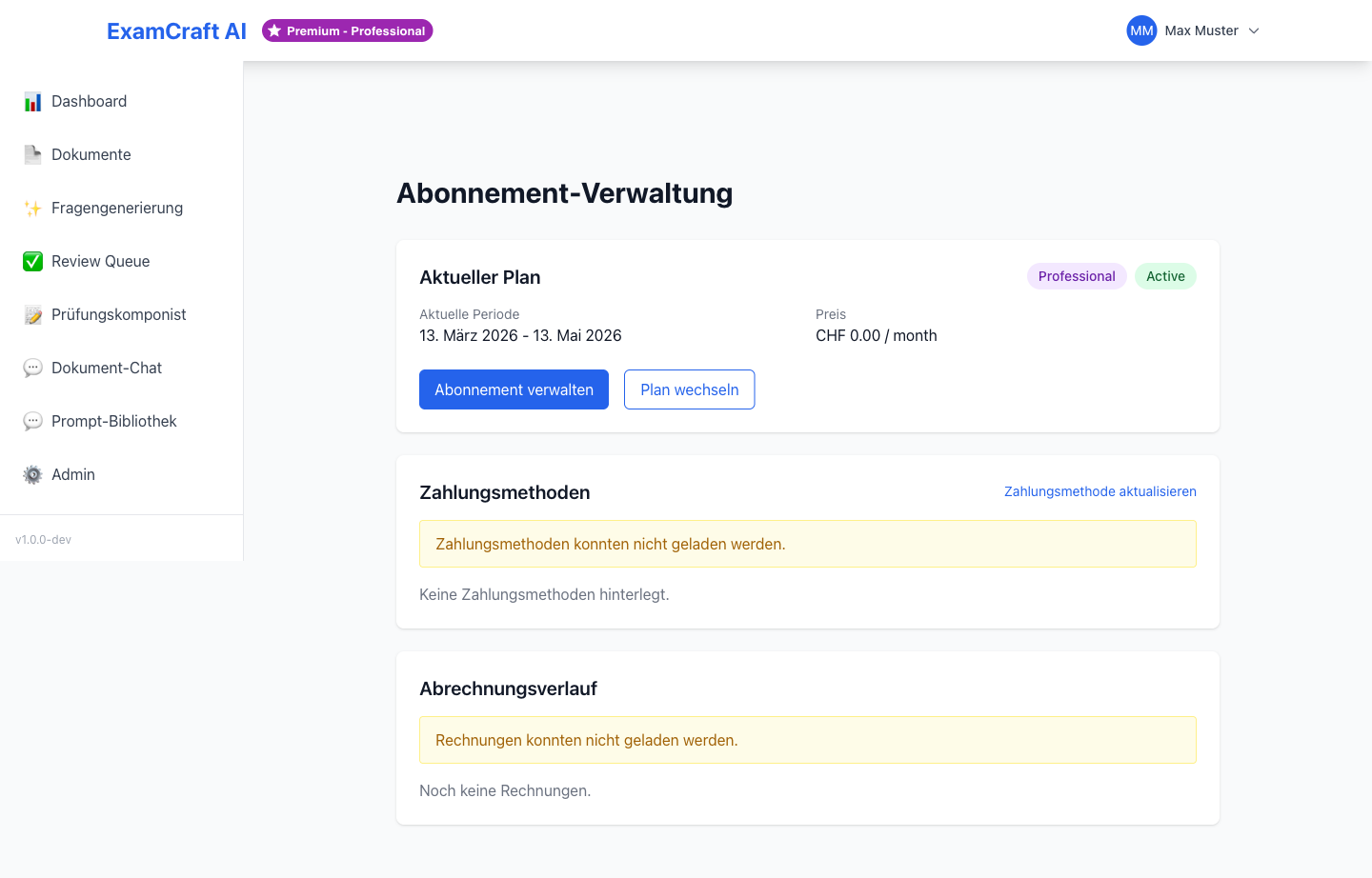
On the Subscription page, you see your current plan, your usage, and can manage your subscription. ExamCraft AI offers four flexibly scalable subscription plans for different needs.
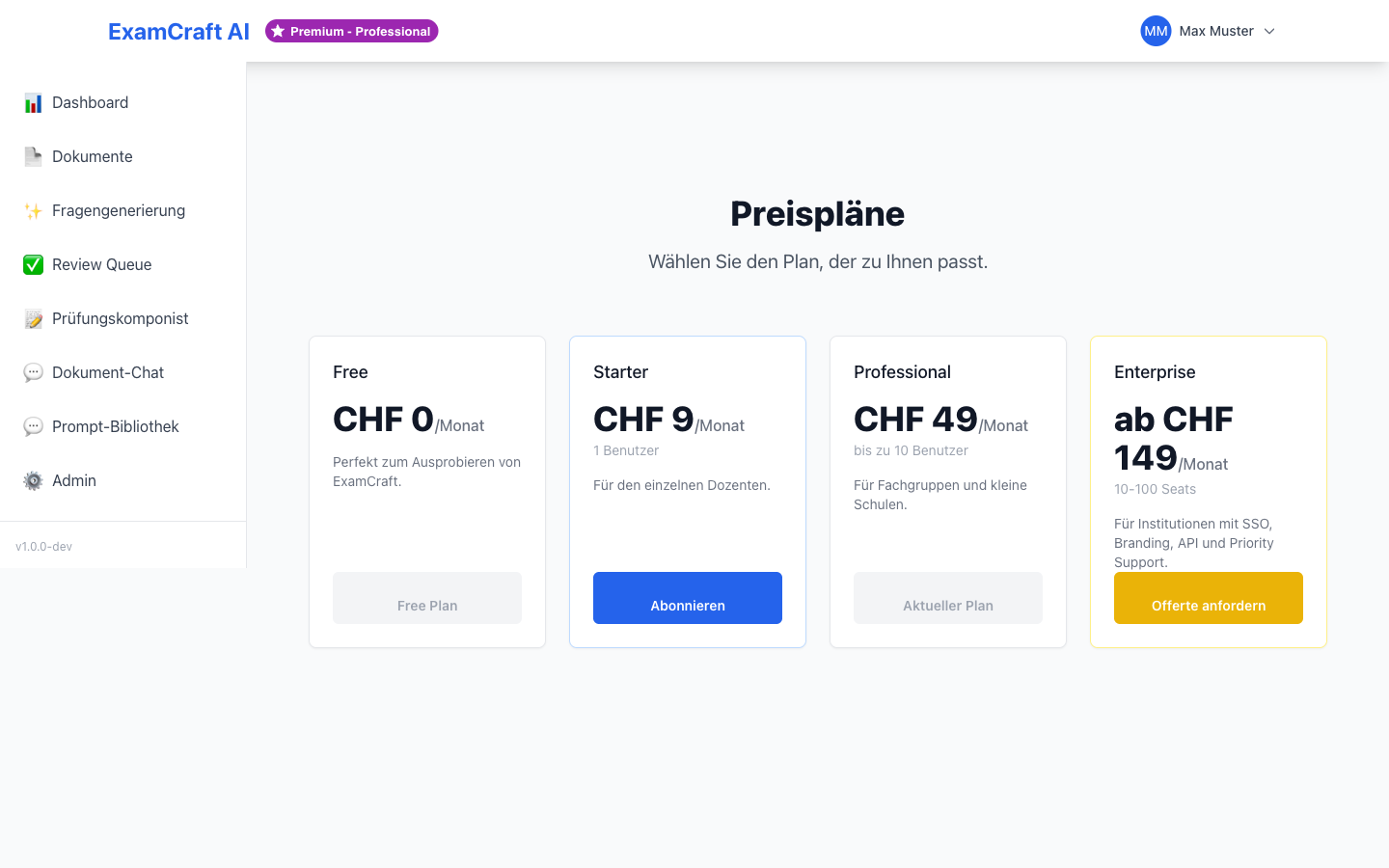
Available Plans
ExamCraft AI offers four subscription plans with increasing features and higher limits:
| Feature | Free | Starter | Professional | Enterprise |
|---|---|---|---|---|
| Documents | 5 | 50 | Unlimited | Unlimited |
| Questions per Month | 20 | 200 | Unlimited | Unlimited |
| Question Types | MC + Open | MC + Open | MC + Open + Matching | MC + Open + Matching |
| Document Chat | — | ✓ | ✓ | ✓ |
| Prompt Upload | — | — | ✓ | ✓ |
| RAG Exams | — | ✓ | ✓ | ✓ |
| Exam Export | PDF + Word | PDF + Word + Excel | PDF + Word + Excel + LMS | |
| Support | Community | Priority | Dedicated | |
| SLA | — | — | 99.5% | 99.9% |
Plan Details
Free – Free, for evaluation and small projects. Optimal basis for getting to know the platform.
Starter – EUR 49/month, for instructors with regular usage. Includes RAG exams and document chat.
Professional – EUR 149/month, for institutions with high volume. Unlimited resources and prompt management.
Enterprise – On request, for large organizations. Dedicated support and custom SLA.
View Current Subscription
Navigate to /subscription or click on Subscription in the main menu. There you see:
- Your current plan with full feature overview
- Your usage (e.g., documents used, questions generated)
- Your next billing date and subscription status
- The subscription badge — also visible at the top left of the Dashboard
Usage metrics are updated in real-time and show:
| Metric | Description |
|---|---|
| Uploaded Documents | Number of active documents vs. limit |
| Questions This Month | Generated questions vs. monthly limit |
| Storage Used | Document size vs. available |
| RAG Requests | Searches performed in this billing period |
Upgrade Plan
You can upgrade to a higher plan at any time. The new plan is activated immediately.
Perform Subscription Upgrade
- Navigate to
/subscription - Click on Upgrade or select the desired plan
- You are redirected to Stripe Checkout
- Enter your payment information:
- Credit card (VISA, Mastercard, American Express)
- SEPA direct debit
- After successful payment, your plan is activated immediately
Billing occurs on the same day in the next month. For monthly plans you pay per 30 days; for annual plans there is a discount.
Annual Subscription
With an annual subscription, you save up to 20% compared to monthly billing. The exact savings are displayed at checkout. Annual subscriptions are billed once.
Upgrade Fees
When upgrading from a monthly plan, the new plan fee is charged proportionally for the remaining days. You do not pay double.
Invoices and Payment Details
Manage your payment method and download invoices.
Open Payment Portal
- Click on Open Stripe Portal or Manage Invoices
- You are redirected to a secure customer dashboard
- There you can:
- Download past invoices – PDF files for your accounting
- Change payment method – Add or update credit card or SEPA
- Edit billing address – For correct invoices
- Cancel subscription – If desired
Invoices contain all information necessary for your accounting and your tax number if provided.
Update Payment Method
- Open the payment portal
- Click on Payment Method
- Select Add New Card or Edit Existing
- Enter the details or select a saved method
- Save the changes
Your payment data is managed and securely stored encrypted via Stripe.
Switch or Downgrade Plan
You can switch to a lower plan or cancel your subscription at any time.
What Happens When Downgrading?
When you switch from a higher to a lower plan, your account is immediately limited to the new plan:
- Your data is retained – All documents, questions, and exams are still accessible
- New features are disabled – Premium features of the previous level no longer work
- Limits apply immediately – If you have exceeded the document limit, you cannot upload new documents until you delete some
What Happens at Expiration?
When you cancel or your subscription expires:
- Your account is downgraded to Free – Automatically after the last paid day
- Your data is retained for 90 days – You can still view and export it
- After 90 days data is deleted – If you do not upgrade again
- You can upgrade at any time – Your data will be restored if you return within 90 days
Data Retained
When switching to a lower plan, your data is not deleted. You can use it again in full after re-upgrading. If you need a backup, export all exams first.
Understand Quotas and Limits
Each plan has specific limits for storage, requests, and features.
Limits per Plan
Free Plan: - 5 uploadable documents - 20 questions per month - No document chat - No RAG exams
Starter Plan: - 50 uploadable documents - 200 questions per month - Unlimited RAG requests - Document chat with up to 100 message pairs per month
Professional + Enterprise: - Unlimited documents and questions - Full spectrum of all features
What Happens When Limits Are Exceeded?
When you reach your limits:
- Document Limit – You cannot upload new documents
- Question Limit – Question generation is disabled until the next billing period
- RAG Limit – Semantic Search no longer works
You can upgrade immediately to increase the limits.
Assessment Pipeline Quotas
The assessment features are tied to subscription tiers:
| Feature | Free | Starter | Professional | Enterprise |
|---|---|---|---|---|
| Assessable Exams/Month | 3 | Unlimited | Unlimited | Unlimited |
| Max. Submissions per Exam | 30 | 50 | Unlimited | Unlimited |
| LLM Grading of Open Questions | — | ✓ | ✓ | ✓ |
| Grade Export Formats | CSV only | CSV | CSV + Moodle CSV + PDF | All + Custom |
| Moodle API Import | — | — | ✓ | ✓ |
| Bulk Actions | — | — | ✓ | ✓ |
| Class + Historical Statistics | — | — | — | ✓ |
| Custom Grade Schemas | — | — | — | ✓ |
When a quota is reached, a multilingual banner appears with an upgrade path. The grade export is additionally blocked as long as open reviews are pending — regardless of tier.